> ## Documentation Index
> Fetch the complete documentation index at: https://chatbase.co/docs/llms.txt
> Use this file to discover all available pages before exploring further.
# Tests
> Check how your AI agent handles a conversation before your customers do. A simulated customer talks to your agent, and each conversation is graded automatically.
A **test** is a conversation your AI agent has with a simulated customer. You describe who the customer is and what they want, and what has to happen for the conversation to count as a success. Chatbase then runs that conversation as many times as you ask, grades each one, and shows you the transcripts.
Use tests to check a change before it reaches customers: new instructions, a new data source, a procedure, or an action. Run the same tests again after the change and compare the pass rate.
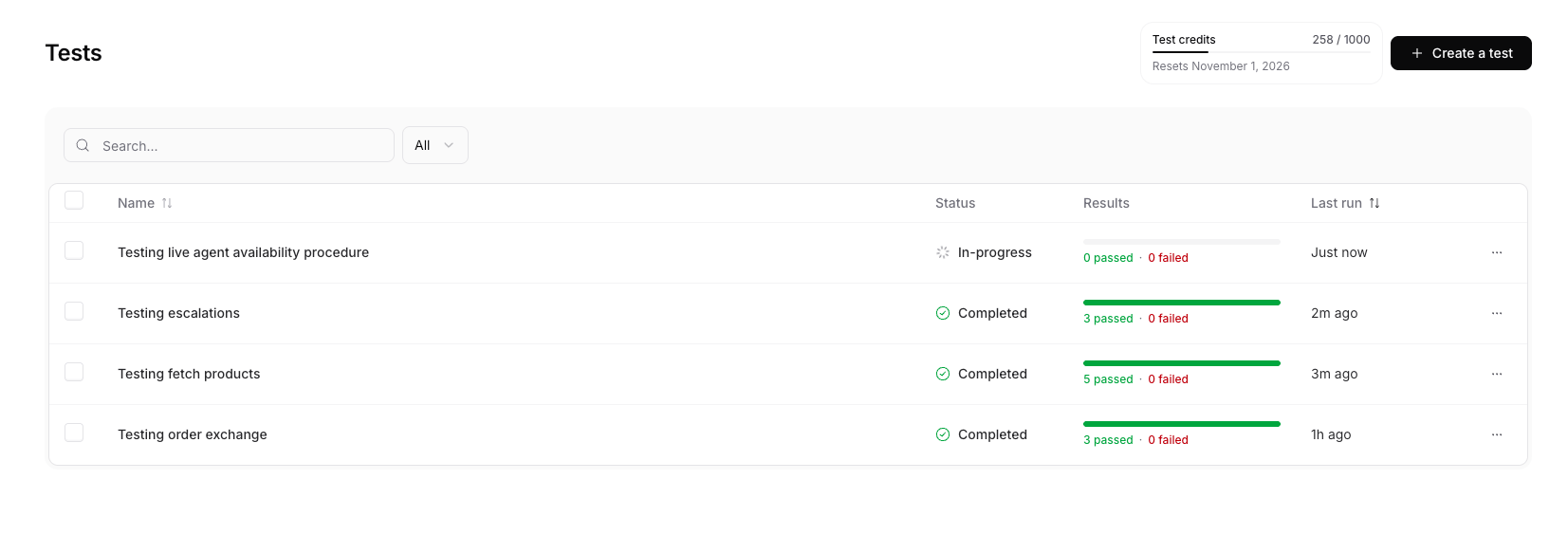 Tests live under **Tests** in your AI agent's sidebar.
## How a test run works
Each run starts one or more conversations. In each conversation:
1. A **simulated customer**, played by another AI model, opens the conversation based on the scenario you wrote. It only knows the scenario and the conversation so far. It never sees your agent's instructions or the success criterion.
2. Your **AI agent** replies using its real setup: its instructions, data sources, actions, and procedures.
3. They keep talking until the customer is done or the conversation reaches its **max turns**.
4. A **judge**, another AI model, reads the finished conversation and decides whether it met your **success criterion**. The judge sees the messages and every action the agent called, with what it sent and what came back.
5. If the test lists **expected actions**, Chatbase also checks which actions the agent called.
A conversation passes only when the judge passes it **and** the action check passes.
The simulated customer and the judge use the same model in every test. This keeps pass rates comparable between tests and between runs.
Tests never reach your customers. The conversations aren't saved to your chat logs, and actions don't run for real unless you set a read-only action to **Live** (see [Action responses](#action-responses)).
## Create a test
On the Tests page, click **Create a test**.
| Field | What to write |
| - | - |
| **Test name** | A label for the test, shown in the list and in exported results. Only you see it. |
| **Simulated user** | Who the customer is and what they want, for example: "A Premium customer who ordered 12 days ago and wants to return one item for a refund. Polite but firm." |
| **Success criterion** | The one thing that has to be true for the conversation to pass, for example: "The agent confirms the order, explains the refund policy once, and issues the refund without escalating." |
| **Expected actions** | Optional. Leave it empty to skip the action check, or add the actions the agent must call. See [Expected actions](#expected-actions). |
| **Action responses** | Optional. What each action returns during the test. See [Action responses](#action-responses). |
| **Max conversation turns** | How many messages the customer can send, from 1 to 20. A conversation that hasn't met the criterion by then fails. |
Keep the success criterion to one clear outcome. The judge grades against it alone, so "books a demo for next week" gives more reliable results than a list of five things.
### Expected actions
This field decides whether Chatbase checks the actions your agent calls. It behaves differently when it's empty and when it has actions.
**Empty.** This is the default. Chatbase doesn't check actions. The agent can call any action, or none, and only the judge grades the conversation. Use this when the outcome is all that matters, for example "the agent explains the refund policy correctly". The test's **Configuration** tab shows **Not asserted**.
**With actions.** The agent must call exactly the actions on the list. No more, no fewer. The action check fails if the agent:
* never called an action on the list, or
* called an action that isn't on the list.
A failed action check fails the conversation, even when the judge passed it.
Adding one action makes the check strict for every action. Any action the agent calls that isn't on the list fails the conversation. So list every action the agent should call in this scenario, not only the main one.
| Expected actions | The agent calls | Result |
| - | - | - |
| Empty | Any actions, or none | No action check. Only the judge grades. |
| Book meeting | Book meeting | Action check passes. |
| Book meeting | Nothing | Fails. Book meeting was never called. |
| Book meeting | Book meeting, Create ticket | Fails. Create ticket wasn't expected. |
| Get slots, Book meeting | Book meeting, Get slots | Action check passes. Order doesn't matter. |
A few rules for how the check counts calls:
* Order doesn't matter.
* Calling the same action several times counts as one call.
* A call that returns an error still counts. The agent chose to call it.
* A procedure loading its own steps isn't an action, so it never counts.
The action check only looks at which actions the agent called, not what it sent to them. To check the inputs, for example that the agent booked the right date, write that into the success criterion. The judge sees each action's inputs.
When the action check fails, the conversation shows why under the judge's verdict. **Never called** lists the missing actions and **Not expected** lists the extra ones.
Each action can appear on the list once. Click **Set response** next to an expected action to control what it returns. See [Action responses](#action-responses).
### Action responses
By default, every action in a test returns a generic success without running, so a test never books a meeting, issues a refund, or creates a ticket. Add an **action response** to control what a specific action returns.
Each action response is either:
| Mode | What happens |
| - | - |
| **Mock** | The action returns the JSON you write, and nothing real runs. Built-in actions start with a sample response shaped like the real one. Custom actions start empty, so paste what your API returns. Turn on **Return as error** to test how the agent handles a failure. |
| **Live** | The agent calls the real action. Only actions that just read data can run live, so nothing is created or changed. Results can differ between runs. |
Each action shows whether it only reads data (**Read-only**) or changes something (**Writes data**). **Live** is locked for actions that write data, and for custom actions, since Chatbase can't tell what your API does.
These actions can run live:
* Stripe: get subscription info, get invoices, find payments
* Shopify: show products, show order, get cart, get metafields
* Cal.com and Calendly: get available slots
* Web search
A live action uses your connected account, for example your Stripe or Cal.com account, the same way it would in a real conversation.
## Run a test
* **From the editor:** click **Save and run** to start 3 conversations, or open the menu next to it to choose 1, 3, 5, 10, or 20.
* **From the Tests page:** select one or more tests, click **Run selected**, and choose how many times to run each one.
* **From a test's row:** open the **⋯** menu and click **Run test**.
* **From a test's page:** click **Run again**, or open the menu next to it to choose how many times.
A single run can start up to 200 conversations, counted as tests times repeats. Each account runs up to 5 conversations at once. The rest wait as **Queued**. Most runs finish within a few minutes.
While a test is running, you can't edit it or run it again. **Run selected** skips any selected test that is already running.
## Manage tests
On the Tests page, search tests by name or filter them by status: **Completed**, **In-progress**, or **Never run**.
Open the **⋯** menu on a test's row to:
* **Edit test**: change its setup. The next run uses the new setup.
* **Run test**: start a run.
* **Duplicate test**: open the editor with a copy of the test, so you can make a variation.
* **Export results**: download the latest run as a CSV file.
* **Delete test**: remove the test and its run history. This can't be undone.
## Read the results
Open a test to see its latest run.
* **Pass rate**: the share of graded conversations that passed. Conversations with **No verdict** aren't counted, since they say nothing about your agent.
* **Runs completed**: how many of the run's conversations have finished.
* **Runs table**: one row per conversation, with its status, the number of turns, the actions the agent called, and how long it took.
| Status | Meaning |
| - | - |
| **Queued** | Waiting to start. |
| **In-progress** | The conversation is running. |
| **Passed** | The judge passed it, and the action check passed if the test has expected actions. |
| **Failed** | The judge failed it, or the agent called the wrong actions. |
| **No verdict** | Something went wrong before the conversation could be graded, for example a timeout. |
Click a row to open the conversation. The judge's reason for its verdict is at the top. If the action check failed, **Never called** and **Not expected** sit under it. Under each agent reply, **Completed N actions** lists the actions the agent called. Click an action to see what it returned, labelled **Mocked response** or **Response**.
The **Configuration** tab shows the test's setup, including its expected actions and action responses.
To share or analyse results elsewhere, click **Export results**. The CSV has one row per conversation with its status, turns, the actions called, missing, and unexpected, the time it took, the judge's reason, and any error.
## Test credits
Test credits are free credits added to your account every month, on top of your message credits. Tests use them first, so you can test your agent without spending message credits.
* Test credits reset on the 1st of each month, at midnight UTC. Unused credits don't carry over.
* They belong to your account, so all AI agents in the account share them.
* Only your agent's replies use credits, the same amount as a reply in a real conversation. The simulated customer and the judge are free.
| Plan | Test credits per month |
| - | - |
| Free | 0 |
| Hobby | 200 |
| Standard | 500 |
| Pro | 1,000 |
| Enterprise | 1,000 |
On the Free plan, tests use message credits from the start.
The Tests page shows how many test credits you've used this month and when they reset.
When your test credits run out, tests use your message credits. Before a run that could use them, Chatbase shows how many test credits you have left, the most the run can use, and how much of that could come from message credits. Click **Run anyway** to start it. The real cost is usually lower, since it depends on how many turns each conversation takes.
When both are used up, you can't start new runs until your test credits reset or you add message credits.
## Limits
| Limit | Value |
| - | - |
| Tests per AI agent | 50 |
| Max conversation turns per test | 20 |
| Conversations per run | 200 |
| Conversations running at once, per account | 5 |
| Size of a mock response | 50,000 characters |
Tests live under **Tests** in your AI agent's sidebar.
## How a test run works
Each run starts one or more conversations. In each conversation:
1. A **simulated customer**, played by another AI model, opens the conversation based on the scenario you wrote. It only knows the scenario and the conversation so far. It never sees your agent's instructions or the success criterion.
2. Your **AI agent** replies using its real setup: its instructions, data sources, actions, and procedures.
3. They keep talking until the customer is done or the conversation reaches its **max turns**.
4. A **judge**, another AI model, reads the finished conversation and decides whether it met your **success criterion**. The judge sees the messages and every action the agent called, with what it sent and what came back.
5. If the test lists **expected actions**, Chatbase also checks which actions the agent called.
A conversation passes only when the judge passes it **and** the action check passes.
The simulated customer and the judge use the same model in every test. This keeps pass rates comparable between tests and between runs.
Tests never reach your customers. The conversations aren't saved to your chat logs, and actions don't run for real unless you set a read-only action to **Live** (see [Action responses](#action-responses)).
## Create a test
On the Tests page, click **Create a test**.
| Field | What to write |
| - | - |
| **Test name** | A label for the test, shown in the list and in exported results. Only you see it. |
| **Simulated user** | Who the customer is and what they want, for example: "A Premium customer who ordered 12 days ago and wants to return one item for a refund. Polite but firm." |
| **Success criterion** | The one thing that has to be true for the conversation to pass, for example: "The agent confirms the order, explains the refund policy once, and issues the refund without escalating." |
| **Expected actions** | Optional. Leave it empty to skip the action check, or add the actions the agent must call. See [Expected actions](#expected-actions). |
| **Action responses** | Optional. What each action returns during the test. See [Action responses](#action-responses). |
| **Max conversation turns** | How many messages the customer can send, from 1 to 20. A conversation that hasn't met the criterion by then fails. |
Keep the success criterion to one clear outcome. The judge grades against it alone, so "books a demo for next week" gives more reliable results than a list of five things.
### Expected actions
This field decides whether Chatbase checks the actions your agent calls. It behaves differently when it's empty and when it has actions.
**Empty.** This is the default. Chatbase doesn't check actions. The agent can call any action, or none, and only the judge grades the conversation. Use this when the outcome is all that matters, for example "the agent explains the refund policy correctly". The test's **Configuration** tab shows **Not asserted**.
**With actions.** The agent must call exactly the actions on the list. No more, no fewer. The action check fails if the agent:
* never called an action on the list, or
* called an action that isn't on the list.
A failed action check fails the conversation, even when the judge passed it.
Adding one action makes the check strict for every action. Any action the agent calls that isn't on the list fails the conversation. So list every action the agent should call in this scenario, not only the main one.
| Expected actions | The agent calls | Result |
| - | - | - |
| Empty | Any actions, or none | No action check. Only the judge grades. |
| Book meeting | Book meeting | Action check passes. |
| Book meeting | Nothing | Fails. Book meeting was never called. |
| Book meeting | Book meeting, Create ticket | Fails. Create ticket wasn't expected. |
| Get slots, Book meeting | Book meeting, Get slots | Action check passes. Order doesn't matter. |
A few rules for how the check counts calls:
* Order doesn't matter.
* Calling the same action several times counts as one call.
* A call that returns an error still counts. The agent chose to call it.
* A procedure loading its own steps isn't an action, so it never counts.
The action check only looks at which actions the agent called, not what it sent to them. To check the inputs, for example that the agent booked the right date, write that into the success criterion. The judge sees each action's inputs.
When the action check fails, the conversation shows why under the judge's verdict. **Never called** lists the missing actions and **Not expected** lists the extra ones.
Each action can appear on the list once. Click **Set response** next to an expected action to control what it returns. See [Action responses](#action-responses).
### Action responses
By default, every action in a test returns a generic success without running, so a test never books a meeting, issues a refund, or creates a ticket. Add an **action response** to control what a specific action returns.
Each action response is either:
| Mode | What happens |
| - | - |
| **Mock** | The action returns the JSON you write, and nothing real runs. Built-in actions start with a sample response shaped like the real one. Custom actions start empty, so paste what your API returns. Turn on **Return as error** to test how the agent handles a failure. |
| **Live** | The agent calls the real action. Only actions that just read data can run live, so nothing is created or changed. Results can differ between runs. |
Each action shows whether it only reads data (**Read-only**) or changes something (**Writes data**). **Live** is locked for actions that write data, and for custom actions, since Chatbase can't tell what your API does.
These actions can run live:
* Stripe: get subscription info, get invoices, find payments
* Shopify: show products, show order, get cart, get metafields
* Cal.com and Calendly: get available slots
* Web search
A live action uses your connected account, for example your Stripe or Cal.com account, the same way it would in a real conversation.
## Run a test
* **From the editor:** click **Save and run** to start 3 conversations, or open the menu next to it to choose 1, 3, 5, 10, or 20.
* **From the Tests page:** select one or more tests, click **Run selected**, and choose how many times to run each one.
* **From a test's row:** open the **⋯** menu and click **Run test**.
* **From a test's page:** click **Run again**, or open the menu next to it to choose how many times.
A single run can start up to 200 conversations, counted as tests times repeats. Each account runs up to 5 conversations at once. The rest wait as **Queued**. Most runs finish within a few minutes.
While a test is running, you can't edit it or run it again. **Run selected** skips any selected test that is already running.
## Manage tests
On the Tests page, search tests by name or filter them by status: **Completed**, **In-progress**, or **Never run**.
Open the **⋯** menu on a test's row to:
* **Edit test**: change its setup. The next run uses the new setup.
* **Run test**: start a run.
* **Duplicate test**: open the editor with a copy of the test, so you can make a variation.
* **Export results**: download the latest run as a CSV file.
* **Delete test**: remove the test and its run history. This can't be undone.
## Read the results
Open a test to see its latest run.
* **Pass rate**: the share of graded conversations that passed. Conversations with **No verdict** aren't counted, since they say nothing about your agent.
* **Runs completed**: how many of the run's conversations have finished.
* **Runs table**: one row per conversation, with its status, the number of turns, the actions the agent called, and how long it took.
| Status | Meaning |
| - | - |
| **Queued** | Waiting to start. |
| **In-progress** | The conversation is running. |
| **Passed** | The judge passed it, and the action check passed if the test has expected actions. |
| **Failed** | The judge failed it, or the agent called the wrong actions. |
| **No verdict** | Something went wrong before the conversation could be graded, for example a timeout. |
Click a row to open the conversation. The judge's reason for its verdict is at the top. If the action check failed, **Never called** and **Not expected** sit under it. Under each agent reply, **Completed N actions** lists the actions the agent called. Click an action to see what it returned, labelled **Mocked response** or **Response**.
The **Configuration** tab shows the test's setup, including its expected actions and action responses.
To share or analyse results elsewhere, click **Export results**. The CSV has one row per conversation with its status, turns, the actions called, missing, and unexpected, the time it took, the judge's reason, and any error.
## Test credits
Test credits are free credits added to your account every month, on top of your message credits. Tests use them first, so you can test your agent without spending message credits.
* Test credits reset on the 1st of each month, at midnight UTC. Unused credits don't carry over.
* They belong to your account, so all AI agents in the account share them.
* Only your agent's replies use credits, the same amount as a reply in a real conversation. The simulated customer and the judge are free.
| Plan | Test credits per month |
| - | - |
| Free | 0 |
| Hobby | 200 |
| Standard | 500 |
| Pro | 1,000 |
| Enterprise | 1,000 |
On the Free plan, tests use message credits from the start.
The Tests page shows how many test credits you've used this month and when they reset.
When your test credits run out, tests use your message credits. Before a run that could use them, Chatbase shows how many test credits you have left, the most the run can use, and how much of that could come from message credits. Click **Run anyway** to start it. The real cost is usually lower, since it depends on how many turns each conversation takes.
When both are used up, you can't start new runs until your test credits reset or you add message credits.
## Limits
| Limit | Value |
| - | - |
| Tests per AI agent | 50 |
| Max conversation turns per test | 20 |
| Conversations per run | 200 |
| Conversations running at once, per account | 5 |
| Size of a mock response | 50,000 characters |