> ## Documentation Index
> Fetch the complete documentation index at: https://chatbase.co/docs/llms.txt
> Use this file to discover all available pages before exploring further.
# Priority
> Rank tickets from Low to Urgent, then sort and filter the inbox so the most pressing work sits at the top.
Priority is a single ranked field on every ticket. It answers one question: of everything waiting, what should someone pick up next?
Every ticket starts at **No priority**. Nothing arrives pre-ranked, so a ticket sitting at No priority means nobody has triaged it yet, not that someone decided it was unimportant. Those are different things, and keeping them apart is what makes an "untriaged" queue possible.
***
## The levels
Ranked highest to lowest:
* **Urgent**
* **High**
* **Normal**
* **Low**
* **No priority**
Sorting and filtering both follow this order, so *Priority (high → low)* puts Urgent on top and untriaged tickets at the bottom.
***
## Setting a ticket's priority
Open a ticket and find the **Priority** row in the **Ticket Details** section of the right-hand panel, just above Tags.
It sits next to the current priority.
Click one and it applies straight away.
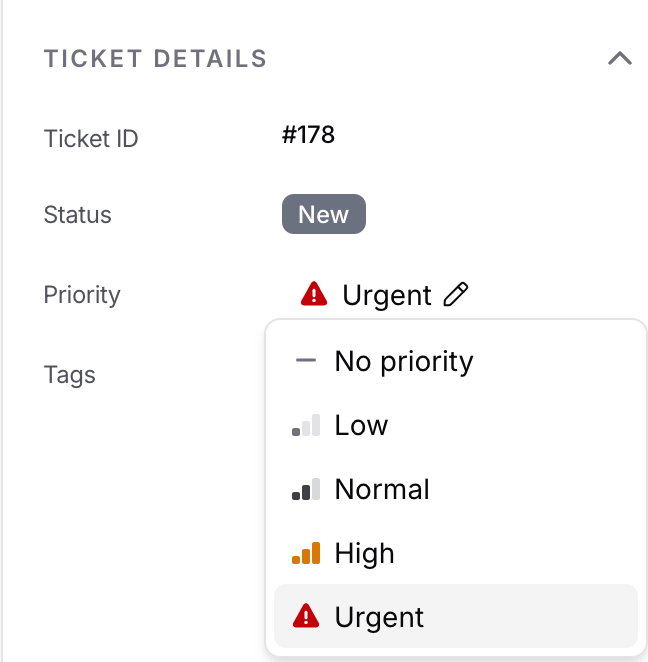 To take a priority back off, pick **No priority** from the same list. The ticket returns to the untriaged pool.
Every change lands on the ticket timeline, recording who moved it, the level it came from, and the level it went to.
Picking the level a ticket already has does nothing. No timeline entry, and the ticket does not jump in the inbox.
***
## Sorting the inbox
Click the **Priority** column header to sort by it, or pick a priority sort when building a [saved view](/docs/user-guides/chatbot/help-desk/saved-views):
* **Priority (high → low)** puts Urgent at the top and untriaged tickets at the bottom.
* **Priority (low → high)** reverses it, which surfaces the untriaged pile first.
Within a single level, tickets are ordered by most recent activity, so the top of an Urgent block is the ticket that moved last.
***
## Filtering by priority
**Priority** is available as a field in the [filter builder](/docs/user-guides/chatbot/help-desk/filters) and inside saved views.
| Operator | Shows you |
| ------------ | ---------------------------------------- |
| `is any of` | Tickets at any of the levels you picked |
| `is none of` | Tickets at none of the levels you picked |
**No priority** is one of the values you can pick, the same as any other level. That is worth knowing because it makes both of these work the way you would expect:
* *Priority is any of No priority* gives you the untriaged queue.
* *Priority is none of Low* returns untriaged tickets too, since No priority is genuinely not Low.
Conditions in a filter are combined with AND. To catch everything above a line, pick the levels you want in one `is any of` condition rather than adding a condition per level, which would ask for tickets at several levels at once and return nothing.
***
## In the ticket list
Priority sits in the ticket list by default, directly after Status. Move or hide it from the **Columns** tab when creating or editing a saved view.
*Priority is any of Urgent, High*, sorted by Priority (high → low), gives your team a standing queue of everything that cannot wait.
***
## Good to know
* Priority is internal. Customers never see it, in the chat widget or anywhere else.
* When a teammate changes the priority of a ticket you have open, it updates without a refresh.
* Anyone with access to the help desk can change a ticket's priority. There is no separate permission for it.
To take a priority back off, pick **No priority** from the same list. The ticket returns to the untriaged pool.
Every change lands on the ticket timeline, recording who moved it, the level it came from, and the level it went to.
Picking the level a ticket already has does nothing. No timeline entry, and the ticket does not jump in the inbox.
***
## Sorting the inbox
Click the **Priority** column header to sort by it, or pick a priority sort when building a [saved view](/docs/user-guides/chatbot/help-desk/saved-views):
* **Priority (high → low)** puts Urgent at the top and untriaged tickets at the bottom.
* **Priority (low → high)** reverses it, which surfaces the untriaged pile first.
Within a single level, tickets are ordered by most recent activity, so the top of an Urgent block is the ticket that moved last.
***
## Filtering by priority
**Priority** is available as a field in the [filter builder](/docs/user-guides/chatbot/help-desk/filters) and inside saved views.
| Operator | Shows you |
| ------------ | ---------------------------------------- |
| `is any of` | Tickets at any of the levels you picked |
| `is none of` | Tickets at none of the levels you picked |
**No priority** is one of the values you can pick, the same as any other level. That is worth knowing because it makes both of these work the way you would expect:
* *Priority is any of No priority* gives you the untriaged queue.
* *Priority is none of Low* returns untriaged tickets too, since No priority is genuinely not Low.
Conditions in a filter are combined with AND. To catch everything above a line, pick the levels you want in one `is any of` condition rather than adding a condition per level, which would ask for tickets at several levels at once and return nothing.
***
## In the ticket list
Priority sits in the ticket list by default, directly after Status. Move or hide it from the **Columns** tab when creating or editing a saved view.
*Priority is any of Urgent, High*, sorted by Priority (high → low), gives your team a standing queue of everything that cannot wait.
***
## Good to know
* Priority is internal. Customers never see it, in the chat widget or anywhere else.
* When a teammate changes the priority of a ticket you have open, it updates without a refresh.
* Anyone with access to the help desk can change a ticket's priority. There is no separate permission for it.