> ## Documentation Index
> Fetch the complete documentation index at: https://chatbase.co/docs/llms.txt
> Use this file to discover all available pages before exploring further.
# AI Draft Replies
> Generate AI-powered draft responses for Help Desk tickets and review them before sending.
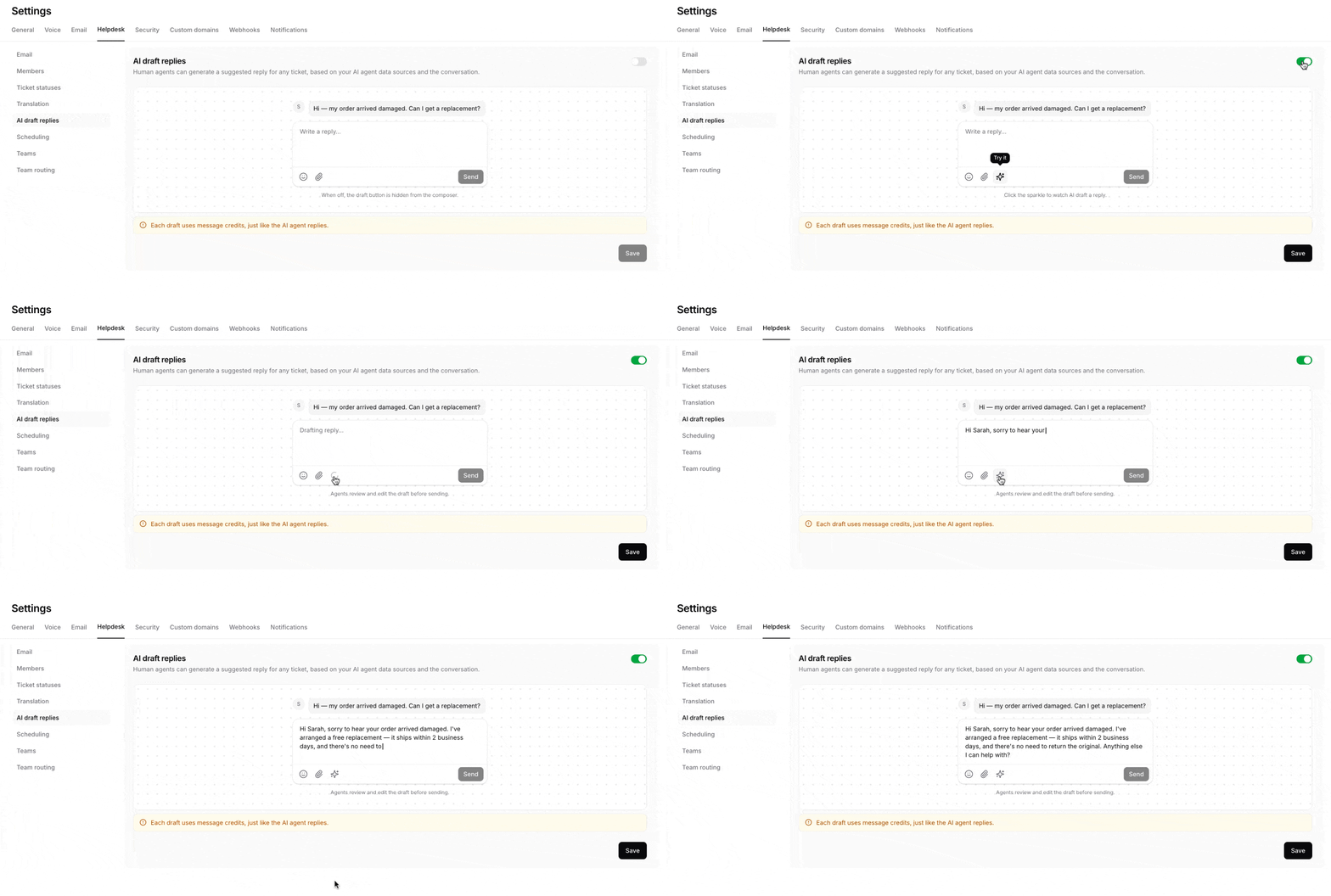
AI Draft Replies help your support team respond faster by allowing human agents to generate suggested responses directly within the Chatbase Help Desk.
The draft is generated using the conversation context and your AI agent’s connected data sources. Human agents can then review, edit, and approve the response before sending it to the customer.
This allows your team to benefit from the AI agent’s knowledge while maintaining full control over every response.
 ## How AI Draft Replies work
When a human agent is handling a ticket, they can click the AI Draft Reply button in the message composer.
Chatbase will generate a suggested response based on:
* The customer’s conversation history
* The latest message in the ticket
* The AI agent’s instructions
* The AI agent’s connected data sources
The human agent can then:
* Review the generated response
* Edit or personalize the content
* Add any missing information
* Send the response when ready
Each generated draft uses message credits, just like a reply generated directly by the AI agent.
## Enable AI Draft Replies
To enable AI Draft Replies:
1. Log in to your Chatbase dashboard.
2. Open your agent.
3. Go to **Settings**.
4. Select **Helpdesk**.
5. Open **AI draft replies**.
6. Enable the AI Draft Replies toggle.
7. Click **Save**.
Once enabled, the AI draft button will appear in the Help Desk message composer for your human agents.
## Generate a draft reply
To generate a response:
1. Open a ticket in the Chatbase Help Desk.
2. Click the AI draft button in the message composer.
3. Wait for the AI agent to generate a suggested response.
4. Review and edit the draft as needed.
5. Click **Send** when the response is ready.
AI-generated drafts are never sent automatically. A human agent must review and send the response.
## Disable AI Draft Replies
To remove the AI draft button from the composer:
1. Go to **Settings** → **Helpdesk** → **AI draft replies**.
2. Disable the toggle.
3. Click **Save**.
Disabling this setting hides the draft button from the message composer but does not affect the AI agent’s other Help Desk functionality.
## How AI Draft Replies work
When a human agent is handling a ticket, they can click the AI Draft Reply button in the message composer.
Chatbase will generate a suggested response based on:
* The customer’s conversation history
* The latest message in the ticket
* The AI agent’s instructions
* The AI agent’s connected data sources
The human agent can then:
* Review the generated response
* Edit or personalize the content
* Add any missing information
* Send the response when ready
Each generated draft uses message credits, just like a reply generated directly by the AI agent.
## Enable AI Draft Replies
To enable AI Draft Replies:
1. Log in to your Chatbase dashboard.
2. Open your agent.
3. Go to **Settings**.
4. Select **Helpdesk**.
5. Open **AI draft replies**.
6. Enable the AI Draft Replies toggle.
7. Click **Save**.
Once enabled, the AI draft button will appear in the Help Desk message composer for your human agents.
## Generate a draft reply
To generate a response:
1. Open a ticket in the Chatbase Help Desk.
2. Click the AI draft button in the message composer.
3. Wait for the AI agent to generate a suggested response.
4. Review and edit the draft as needed.
5. Click **Send** when the response is ready.
AI-generated drafts are never sent automatically. A human agent must review and send the response.
## Disable AI Draft Replies
To remove the AI draft button from the composer:
1. Go to **Settings** → **Helpdesk** → **AI draft replies**.
2. Disable the toggle.
3. Click **Save**.
Disabling this setting hides the draft button from the message composer but does not affect the AI agent’s other Help Desk functionality.